Home Kubernetes Cluster
A 4-node Kubernetes cluster built on Orange Pi 5 single-board computers. It runs real workloads — an AI agent platform, home automation, graph databases, and security scanning — not as a learning exercise alone, but as infrastructure I depend on daily.
Why Build This
Section titled “Why Build This”Three reasons converged:
Learning by doing. I wanted vanilla Kubernetes experience — not a managed service where the hard parts are abstracted away, and not a simplified distribution that hides the operational reality. Setting up kubeadm on ARM64 SBCs means confronting every layer: CNI networking, storage provisioning, certificate rotation, etcd health, kubelet configuration. The kind of understanding you can’t get from documentation alone.
A platform for AI agents. I’m building OpenClaw, an AI agent platform that needs always-on infrastructure with persistent storage, network policies, and the ability to run multiple interconnected services. A home cluster gives me full control over the stack without cloud costs that scale with experimentation.
Production-grade homelab. Home Assistant controls physical systems in my house. That demands reliability — not “hobby project” reliability, but actual operational discipline. Running it on Kubernetes forces me to think about high availability, rolling updates, and failure recovery for something that matters.
Architecture
Section titled “Architecture”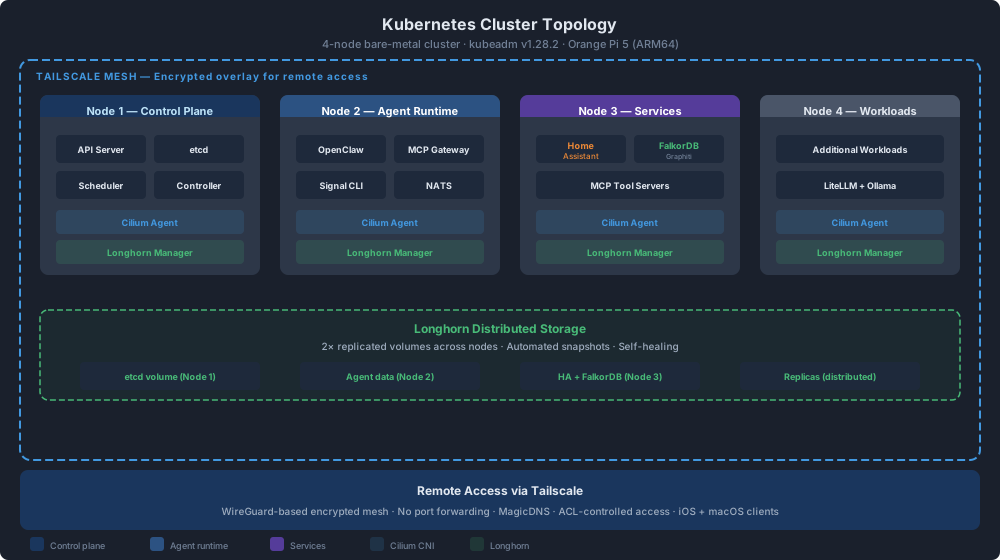
Each node is an Orange Pi 5 — Rockchip RK3588S, 8 ARM Cortex cores, 16 GB RAM. Total cluster capacity: 32 cores, 64 GB RAM. Modest by cloud standards, substantial for a homelab.
Technology Choices
Section titled “Technology Choices”Kubernetes via kubeadm
Section titled “Kubernetes via kubeadm”Not K3s, not MicroK8s. Vanilla Kubernetes deployed with kubeadm. The tradeoff is more operational overhead in exchange for a cluster that behaves exactly like production Kubernetes everywhere else. When I troubleshoot an issue here, the knowledge transfers directly to any enterprise or cloud deployment.
Version: v1.29 (upgraded from v1.28.2 via preflight-validated rolling update)
Cilium CNI (v1.17)
Section titled “Cilium CNI (v1.17)”Cilium replaces kube-proxy and handles all networking via eBPF programs attached directly to the Linux kernel. Two reasons this matters on resource-constrained nodes:
- Performance. eBPF avoids the iptables chains that scale poorly with service count. On nodes with 16 GB RAM running multiple workloads, efficiency matters.
- Network policies.
CiliumNetworkPolicyresources provide L3-L7 policy enforcement. Every namespace has explicit ingress/egress rules. Home Assistant, which controls physical devices, gets locked down to only the traffic it needs.
Recent operational work moved this from “policies exist” to “policy behavior is understood at the identity level.” In June 2026, a Vault outage investigation found that nginx-ingress runs hostNetwork, so traffic from the ingress controller is seen by Cilium as the host / remote-node identity rather than as ordinary pod-to-pod traffic. The fix was a dedicated Cilium policy allowing those identities to reach Vault on TCP 8200, preserving the default-deny posture while restoring AppRole and UI access. That kind of failure mode is exactly why running the real dataplane at home is valuable: the lesson transfers directly to production clusters.
Longhorn Storage
Section titled “Longhorn Storage”Distributed block storage across all four nodes with 2x replication. When a node goes down for maintenance, volumes remain available. Longhorn was chosen because it’s designed for commodity hardware — it doesn’t assume enterprise SSDs or dedicated storage networks. It runs on the same disks the OS uses, which is exactly the constraint SBCs impose.
Version: v1.10.1, 2x replication factor
Tailscale
Section titled “Tailscale”Every node joins a Tailscale mesh network. No ports exposed to the public internet. Remote access works through WireGuard tunnels with identity-based authentication. This is the only path into the cluster from outside the local network.
GitOps with Helm
Section titled “GitOps with Helm”All workloads are defined as Helm charts and deployed through a GitOps workflow. Infrastructure changes go through version control. This isn’t optional when you’re running a cluster you can’t physically access half the time — you need to know exactly what’s deployed and why.
What Runs On It
Section titled “What Runs On It”| Workload | Purpose |
|---|---|
| OpenClaw | AI agent platform — long-running autonomous agents with tool access, memory, and inter-agent communication |
| Home Assistant | Home automation — thermostat, lighting, presence detection, physical device control |
| MCP Gateway | Model Context Protocol router — connects AI agents to tools and data sources |
| Signal CLI | Messaging integration — agents can send and receive Signal messages |
| FalkorDB | Graph database backing Graphiti — episodic and semantic memory for AI agents |
| MCP Tool Servers | Various tool servers — web search, academic research, memory, Jira/Confluence, Home Assistant, and custom integrations |
| Vault + External Secrets | Centralized secret storage and Kubernetes secret synchronization for agents and platform services |
| Garage Object Storage | S3-compatible object storage for agent file sharing, with shared browser-published files and per-agent isolated buckets |
| Security Scanning | Trivy and kube-bench for vulnerability scanning and CIS benchmark compliance |
Deep Dives
Section titled “Deep Dives”Each major infrastructure domain has a dedicated page with architecture details, configuration specifics, and operational lessons:
- Networking — Cilium eBPF dataplane, CiliumNetworkPolicy patterns, MetalLB L2 load balancing, ingress-nginx routing
- Storage — Longhorn distributed block storage, 2x replication strategy, PVC patterns, backup roadmap
- GitOps — Flux v2 reconciliation, Helm chart management, deployment workflows, secrets with Vault and External Secrets Operator
Challenges and Lessons
Section titled “Challenges and Lessons”ARM64 Compatibility
Section titled “ARM64 Compatibility”Not everything publishes ARM64 container images. Every new tool requires checking multi-arch support before adoption. Some projects publish linux/amd64 only, which means either finding alternatives, building from source, or contributing ARM64 support upstream. This is getting better year over year, but it’s still a real constraint.
Vendor Kernels
Section titled “Vendor Kernels”The Orange Pi 5 runs a Rockchip vendor kernel (6.1.115-vendor-rk35xx). This isn’t mainline Linux — it includes proprietary patches for hardware support. The practical impact: kernel features like BTF (BPF Type Format) may not be available, which affects tools that depend on CO-RE (Compile Once, Run Everywhere) eBPF. Falco, for example, needs to fall back to its kernel module driver instead of modern eBPF on these nodes.
Resource Constraints
Section titled “Resource Constraints”16 GB of RAM per node sounds generous until you’re running a graph database, an AI agent platform, a home automation system, and Kubernetes system components on the same hardware. Resource requests and limits aren’t aspirational here — they’re load-bearing. Every workload gets explicit CPU and memory bounds, and I’ve learned exactly what happens when you get them wrong.
The same constraint shows up in storage. Longhorn’s replica scheduler exposed that two nodes had fallen below the configured free-space reservation threshold, leaving some low-risk Tailscale state volumes unable to place a third replica. The resolution was not “force it through”; it was to classify the data, document that Tailscale state is reconstructable, and explicitly set those PVCs to two replicas while leaving more critical volumes protected. Homelab hardware makes tradeoffs visible instead of abstract.
Garage object storage pushed that lesson further. Deploying an S3-compatible store on top of Longhorn required an explicit single-replica storage class rather than pretending a four-node ARM64 homelab has cloud-style spare capacity. The final design keeps the public proof surface small — a tailnet-only browser endpoint serving a shared agent-files bucket — while giving each agent its own scoped bucket and S3 key. A cross-bucket access test with another agent’s key returning 403 AccessDenied is the important part: the cluster can now provide file sharing without turning storage into a shared-secret free-for-all.
That design matured further once the platform moved beyond “files can be stored” to “files can be managed like a real service.” The current Garage layer now enforces per-bucket quotas, uses helper-written expiry metadata plus a cleanup CronJob to implement lifecycle deletion, and has a committed end-to-end proof path covering upload -> share/presign -> S3 retrieve -> browser retrieve via the stable files.taila78371.ts.net website endpoint -> expiry cleanup -> gone check. A seemingly small review finding mattered here too: object listing had to follow ListObjectsV2 continuation tokens so lifecycle cleanup and file-share helpers would behave correctly beyond the first page of objects. That’s the kind of operational edge case a real cluster flushes out quickly.
Running Production on SBCs
Section titled “Running Production on SBCs”Single-board computers aren’t designed for 24/7 server workloads. Thermal management matters — sustained CPU load on passively cooled boards will thermal-throttle. Storage I/O on eMMC or SD cards has different reliability characteristics than enterprise SSDs. Power supplies need to be reliable; an unstable 5V rail takes out a node. These are infrastructure problems, not Kubernetes problems, but they’re inseparable when your data center is a shelf in your office.
Operational Reality
Section titled “Operational Reality”This cluster has taught me more about Kubernetes operations than any managed service could. Certificate expiration, etcd compaction, node drain procedures, storage rebalancing after a node failure — these are things you read about in documentation but internalize only when they happen at 11 PM and Home Assistant stops working.
A recurring theme is that “healthy pod” does not mean “usable platform capability.” The MCP Gateway now treats backend registration as an explicit infrastructure contract: a tool server can be running and still be unreachable if it is absent from the gateway’s static servers.yaml configuration. That distinction matters when agents depend on tools as production infrastructure, not optional conveniences.
Pod Security Hardening
Section titled “Pod Security Hardening”The platform has been hardened toward Kubernetes’ restricted Pod Security Standard. The MCP tool-server fleet now runs with non-root users, runAsNonRoot, seccompProfile: RuntimeDefault, allowPrivilegeEscalation: false, and capabilities.drop: [ALL] where applicable. The stateful memory server needed a separate pattern: pod-level fsGroup so a non-root process can still write its Longhorn-backed /data volume. This was a useful reminder that security controls have to preserve the workload’s actual write paths, not just satisfy a checklist.
Upgrade Discipline
Section titled “Upgrade Discipline”The cluster follows a deliberate upgrade methodology — components are upgraded one at a time with preflight validation, not in bulk.
K8s v1.28 → v1.29 Upgrade (FAD-537)
Section titled “K8s v1.28 → v1.29 Upgrade (FAD-537)”The Kubernetes minor version upgrade used a preflight check approach:
- Dependency audit — identify all components with K8s version constraints (cert-manager, ingress-nginx, Cilium, Longhorn, Flux)
- Prerequisite upgrades — cert-manager v1.13 → v1.16 (FAD-538), ingress-nginx v1.11.3 → v1.11.8 (FAD-539), each validated independently
- Preflight checks —
kubeadm upgrade planon control plane, verify all system pods healthy, confirm storage volumes accessible - Rolling node upgrade — drain, upgrade kubelet/kubeadm, uncordon, verify workloads reschedule correctly
- Post-upgrade validation — full workload health check, verify no degraded PVCs, confirm CNI policies still enforcing
Each prerequisite upgrade (cert-manager, ingress-nginx) was its own ticket with its own validation — not bundled into the K8s upgrade. This isolation means a failed cert-manager upgrade doesn’t block the entire K8s upgrade path.
Cilium v1.16 → v1.17 Upgrade
Section titled “Cilium v1.16 → v1.17 Upgrade”The Cilium upgrade required special handling because Cilium is the network. A failed Cilium upgrade doesn’t just break one workload — it breaks all networking cluster-wide. The upgrade temporarily reset network policies, which surfaced as complete outbound HTTPS failure on agent pods until FQDN egress rules were re-applied. This validated the defense-in-depth value of FQDN-based egress filtering: when the policies disappeared, agents lost all external API access rather than gaining unrestricted access.
Infrastructure Specs
Section titled “Infrastructure Specs”| Component | Detail |
|---|---|
| Nodes | 4× Orange Pi 5 (RK3588S) |
| CPU | 8 cores per node (32 total) — ARM Cortex-A76/A55 |
| RAM | 16 GB per node (64 GB total) |
| Kubernetes | v1.29 via kubeadm |
| CNI | Cilium with eBPF |
| Storage | Longhorn v1.10.1 for block storage, plus Garage v1.0.1 for S3-compatible object storage; generally 2× replication with documented single-replica policy exceptions |
| Networking | Tailscale mesh (WireGuard), ingress-nginx, CiliumNetworkPolicy default-deny posture |
| Secrets | Vault + External Secrets Operator |
| Deployment | Helm charts, GitOps, commit-first operational discipline |
| Kernel | 6.1.115-vendor-rk35xx (Rockchip) |
| Architecture | ARM64 (aarch64) |