K8s Deep Dive: Networking
This is a companion to the Home Kubernetes Cluster overview. That page covers the full stack at a high level. This one goes deep on networking — how traffic enters the cluster, how it moves between pods, and how it gets observed and controlled.
Networking on bare-metal Kubernetes is fundamentally different from managed cloud environments. There’s no cloud load balancer API, no VPC-native pod networking, no managed firewall rules. Every layer has to be explicitly built and configured. That’s the tradeoff for running on Orange Pi 5 SBCs: complete control, complete responsibility.
The Stack
Section titled “The Stack”Traffic flows through four distinct layers before it reaches a pod. Each layer has a specific job, and understanding the handoffs between them is key to debugging anything network-related.
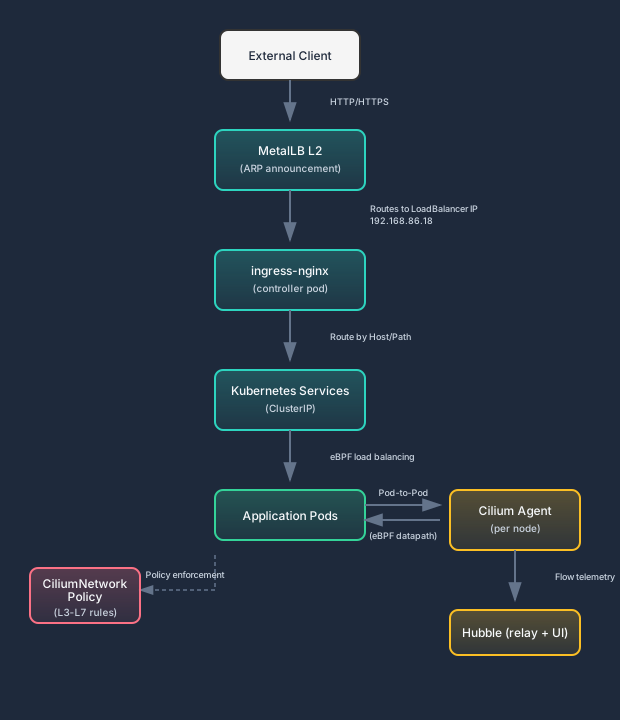
The short version: MetalLB gives us a LoadBalancer IP on the local network. ingress-nginx listens on that IP and routes HTTP(S) traffic by hostname and path. Cilium handles everything from the Service layer down — load balancing to pods, pod-to-pod communication, and policy enforcement. Hubble watches all of it.
Cilium with eBPF
Section titled “Cilium with eBPF”Version: 1.17 (upgraded from 1.16.18) | Kernel: 6.1.115-vendor-rk35xx | Mode: kube-proxy replacement
Cilium is the CNI (Container Network Interface) for the cluster, and it replaces kube-proxy entirely. There is no kube-proxy DaemonSet running on these nodes. Cilium handles service discovery, load balancing, and network policy enforcement through eBPF programs attached directly to the Linux kernel’s networking stack.
The decision to use Cilium over alternatives like Calico or Flannel is documented in ADR-001: Cilium as CNI over Calico. The short version: eBPF performance on resource-constrained hardware, L7-aware network policies for IoT segmentation, and Hubble observability out of the box.
Why eBPF Matters on SBCs
Section titled “Why eBPF Matters on SBCs”The traditional kube-proxy model uses iptables rules for service routing. Every Kubernetes Service creates a set of iptables chains — PREROUTING, FORWARD, POSTROUTING — and each packet traverses them linearly. With 50 services, that’s potentially hundreds of rules evaluated per packet. The lookup complexity is O(n) where n is the number of rules.
eBPF replaces this with hash-map lookups in kernel space. A packet arrives, Cilium’s eBPF program does a single hash-map lookup to find the target pod, and the packet is redirected. O(1) regardless of how many services exist.
On a cloud VM with 32 cores and 128 GB RAM, the iptables overhead is noise. On an Orange Pi 5 with 8 ARM cores (half of which are efficiency cores) and 16 GB RAM running a graph database, an AI agent platform, and Kubernetes system components simultaneously — it’s not noise. Every CPU cycle spent traversing iptables chains is a cycle not available for actual workloads.
The practical impact: Cilium’s eBPF kube-proxy replacement measurably reduced CPU overhead on these nodes. Not by a dramatic amount in absolute terms, but enough to matter when you’re running close to capacity.
How It Works in This Cluster
Section titled “How It Works in This Cluster”Cilium runs as a DaemonSet — one agent pod per node. Each agent:
-
Compiles eBPF programs for the node’s kernel at startup. The Rockchip vendor kernel (6.1.115) supports eBPF, which was verified before deploying Cilium. This is non-negotiable: if the kernel doesn’t support the required eBPF features, Cilium won’t start.
-
Manages pod networking by assigning IPs from the cluster CIDR, setting up veth pairs, and attaching eBPF programs to each pod’s network interface.
-
Replaces kube-proxy by watching the Kubernetes API for Service and Endpoint changes, then updating eBPF maps accordingly. Service traffic never touches iptables.
-
Enforces CiliumNetworkPolicy rules by attaching eBPF filters that inspect packets at L3, L4, and L7 before allowing or dropping them.
CiliumNetworkPolicy
Section titled “CiliumNetworkPolicy”Standard Kubernetes NetworkPolicy resources operate at L3/L4 — you can allow or deny traffic based on IP addresses, CIDR blocks, ports, and protocols. That’s useful but limited. You can say “allow TCP/443 from namespace X” but you can’t say “allow GET requests to /api/health but deny POST requests to /api/admin.”
CiliumNetworkPolicy adds L7 awareness. Three capabilities matter most in this cluster:
HTTP-Aware Rules
Section titled “HTTP-Aware Rules”CiliumNetworkPolicy can inspect HTTP headers, methods, and paths. For a cluster running Home Assistant (which exposes an HTTP API that controls physical devices in my house), this is the difference between “allow HTTP traffic” and “allow GET requests to specific API endpoints only.” The threat model includes compromised IoT devices making unexpected API calls — L3/L4 policies can’t distinguish a legitimate sensor reading from a malicious command injection if they’re both HTTP on the same port.
DNS-Aware Rules
Section titled “DNS-Aware Rules”Policies can reference external destinations by DNS name rather than IP address. This matters for egress control — you can allow a pod to reach api.openai.com without hardcoding IP ranges that change whenever the provider updates their infrastructure. Cilium’s DNS proxy intercepts DNS queries and dynamically updates the allowed IP set.
Identity-Based Policies
Section titled “Identity-Based Policies”Instead of referencing pods by IP (which is ephemeral in Kubernetes), Cilium assigns identities based on labels. Policies reference these identities, which means they survive pod restarts, rescheduling, and IP changes. A policy that says “allow traffic from pods with label app=openclaw-api” works regardless of which node the pod lands on or what IP it gets.
Current Policies on the Cluster
Section titled “Current Policies on the Cluster”The cluster currently has targeted egress policies:
| Namespace | Policy Name | Purpose |
|---|---|---|
openclaw | openclaw-ha-egress | Controls outbound traffic from OpenClaw to Home Assistant |
openclaw | openclaw-egress | Allows specific in-cluster service egress such as LiteLLM on TCP/4000 |
openclaw-debra | openclaw-debra-egress | Mirrors the OpenClaw service-egress pattern for Debra’s agent |
openclaw-principal-b | openclaw-principal-b-ha-egress | Legacy/parallel principal namespace policy for Home Assistant access |
One operational nuance worth noting: Home Assistant runs with hostNetwork: true because it needs direct access to the host network for mDNS device discovery and multicast traffic that doesn’t work well through Kubernetes networking. The consequence is that pod-level CiliumNetworkPolicy enforcement is bypassed for HA’s inbound traffic — the pod shares the host’s network namespace, so Cilium’s per-pod eBPF filters aren’t in the packet path. The egress policies on the calling side (OpenClaw’s namespaces) are what actually enforce the boundary. This is a known tradeoff, documented and intentional.
FQDN Egress Filtering (FAD-461)
Section titled “FQDN Egress Filtering (FAD-461)”The initial cluster deployment had a significant security gap: agent pods could make outbound HTTPS calls to any destination. With autonomous AI agents running 24/7 — making API calls, fetching web content, coordinating with external services — unrestricted egress is a liability. A prompt injection that causes an agent to exfiltrate data to an attacker-controlled endpoint is trivially exploitable without egress controls.
FQDN-based egress filtering uses Cilium’s DNS proxy to restrict outbound traffic by domain name:
apiVersion: cilium.io/v2kind: CiliumNetworkPolicymetadata: name: openclaw-egress-fqdnspec: endpointSelector: matchLabels: app: openclaw egress: - toFQDNs: - matchName: "api.anthropic.com" - matchName: "discord.com" - matchName: "gateway.discord.gg" - matchName: "api.github.com" - matchName: "api.search.brave.com" toPorts: - ports: - port: "443" protocol: TCPThe Cilium v1.16 → v1.17 upgrade temporarily reset these policies, which surfaced as complete outbound HTTPS failure on agent pods. This was actually a useful validation: when FQDN filtering disappeared, agents lost all external API access rather than gaining unrestricted access. The default-deny posture held — the policies were additive exceptions, not the only thing preventing exfiltration.
The FQDN policy review (conducted jointly between Fiducian and ClaudeCodeAgent) clarified which external calls originate from agent pods versus the MCP Gateway pod. Agent pods need direct access to a small set of conversational and coordination endpoints; tool-mediated web access should not expand that set by default. The old native web_fetch path was retired after it repeatedly timed out on public URLs (FAD-783). Fetching public documentation and news now goes through first-class MCP web tools (fetch__fetch_url, websearch__*, and read-website backends) running in backend/tool pods with their own egress posture. That separation is intentional: agent pods keep narrow egress, while purpose-built tool services handle open-web retrieval.
Vault Egress Audit (FAD-462)
Section titled “Vault Egress Audit (FAD-462)”The security review also identified that Vault (port 8200) egress from agent pods needed auditing. Agents access Vault-injected secrets via environment variables (not direct API calls), so the Vault egress path is through the External Secrets Operator, not from agent pods directly. This was confirmed and documented — no additional egress rules needed for agent-to-Vault traffic.
Internal Service Egress for LiteLLM (FAD-769, FAD-772)
Section titled “Internal Service Egress for LiteLLM (FAD-769, FAD-772)”The May LiteLLM routing work exposed a different class of networking problem: not every important egress path leaves the cluster. Moving agent chat traffic through the internal LiteLLM Gateway required explicit Kubernetes NetworkPolicy allowances from the OpenClaw namespaces to litellm-gateway.llm-gateway.svc.cluster.local:4000.
That rule lives in the namespace NetworkPolicy layer rather than the FQDN-oriented CiliumNetworkPolicy layer. The distinction matters operationally. The Cilium policies govern external HTTPS/FQDN access; the Kubernetes NetworkPolicy handles in-cluster service-to-service reachability such as OpenClaw → LiteLLM. FAD-769 added the TCP/4000 allowance for Fiducian’s namespace, and FAD-772 mirrored it for Debra’s agent namespace.
The follow-on routing tickets (FAD-775 and FAD-776) proved why reachability checks have to match the application path. A raw curl to LiteLLM validates DNS and L3/L4 policy, but it does not prove that OpenClaw’s guarded model-fetch path accepts the internal base URL. The final acceptance gate had to drive an actual OpenClaw chat turn and then check gateway logs for SSRF-blocking errors. Networking verification is not just “can a packet get there?” — it is “can the intended application path get there without bypassing the guardrails?”
Web Egress Posture After FAD-783
Section titled “Web Egress Posture After FAD-783”FAD-783 looked like a simple bug — public URL fetches timing out — but the resolution changed the network story in a useful way. Instead of widening direct internet egress from the agent pods, the platform retired the native web-fetch path and routed web retrieval through MCP fetch/read/search tools.
That keeps the trust boundary cleaner. Agent runtimes remain constrained by namespace policies and only talk directly to the small set of endpoints they actually need for conversation, coordination, and internal model routing. Open-web access is delegated to dedicated tool services where egress can be reasoned about separately. For an autonomous-agent cluster, that separation is a security feature, not just an implementation detail.
Residential WAN IP Resilience (Route 53 DDNS)
Section titled “Residential WAN IP Resilience (Route 53 DDNS)”This cluster runs on a residential internet connection, which means the public WAN IP is not static — the ISP can rotate it on a lease renewal or an outage recovery. Because every public hostname (ha.efiducian.com, llm.efiducian.com, and the rest) ultimately resolves to that single residential IP via Route 53 A records, a silent WAN IP change breaks all external endpoints at once, including the cert-manager DNS-01 path and any agent that depends on reaching the cluster from outside.
The fix (FAD-1109 research → FAD-1118 implementation) was deliberately the smallest one that preserves the existing ingress story. Rather than re-architecting onto Cloudflare Tunnel or an overlay, the cluster keeps ingress-nginx + MetalLB + Route 53 + cert-manager DNS-01 exactly as-is and adds a dynamic-DNS reconciler that keeps the Route 53 records pointed at the current WAN IP.
How it works:
- A Kubernetes CronJob (
route53-ddns) runs every 5 minutes on an arm64 node. - It learns the current public WAN IP and compares it against what the covered hostnames currently resolve to, using DNS-over-HTTPS (
https://dns.google/resolve) for the comparison. That side-steps a least-privilege gap: the reused cert-manager Route 53 credential can write changes but lacksroute53:ListResourceRecordSets, so the reconciler never depends on listing the zone. - Reconciliation is exact-singleton: a record is only considered healthy when public DNS resolves to exactly the one desired WAN IP. A stale multi-A record set is treated as drift, not as healthy.
- Hostnames with no current public A record (for example
familydashboard.efiducian.comandjaeger.efiducian.com) are intentionally excluded from the managed record set — including them would expand public exposure, which would violate the “don’t change the existing ingress architecture” constraint.
Safety posture: the reconciler ships in DRY_RUN=true mode — the CronJob runs on schedule and prints the intended Route 53 UPSERT plan but does not mutate DNS. While dry-run, it mounts no AWS credentials and sets automountServiceAccountToken: false, so the steady-state job carries no standing write capability. Flipping to live writes is a separate, deliberate decision gated behind provisioning a least-privilege Route 53 write credential (tracked as FAD-1299), not an incidental config change. The AWS CLI image is pinned by digest.
This is the same design philosophy as the rest of the network stack: solve the specific bare-metal/residential problem with the least-disruptive layer, keep the blast radius small, and make any expansion of privilege or exposure an explicit, reviewed step rather than a side effect.
Hubble Observability
Section titled “Hubble Observability”Hubble is Cilium’s observability layer. It taps into the same eBPF programs that handle networking and policy enforcement, which means it sees every packet, every DNS query, every HTTP request, and every policy verdict — with zero additional instrumentation in the application code.
Three components make up the Hubble deployment:
| Component | ClusterIP | Port | Purpose |
|---|---|---|---|
| hubble-relay | 10.98.200.220 | 80 | Aggregates flow data from all Cilium agents into a single gRPC stream |
| hubble-ui | 10.105.175.16 | 80 | Web dashboard for visualizing service maps and traffic flows |
| hubble-peer | 10.105.63.222 | 443 | Node-to-node communication for distributed flow collection |
What Hubble Shows
Section titled “What Hubble Shows”The practical value of Hubble in this cluster:
-
Traffic flows in real time. I can see exactly which pods are talking to which other pods, what protocols they’re using, and how much data is moving. When an AI agent starts making unexpected external calls, it shows up immediately.
-
DNS queries. Every DNS lookup from every pod is visible. This is how I verify that egress DNS policies are working — if a pod tries to resolve a domain it shouldn’t be reaching, Hubble captures the query and the policy verdict.
-
HTTP request/response metadata. For L7-inspected traffic, Hubble shows HTTP methods, paths, status codes, and latency. Useful for debugging service-to-service communication without deploying a separate service mesh.
-
Policy verdicts. Every packet that gets allowed or dropped by a CiliumNetworkPolicy is logged with the specific policy that made the decision. When something breaks after a policy change, Hubble tells you exactly which rule is dropping the traffic.
The Hubble UI is accessible within the cluster via its ClusterIP. For remote access, I use kubectl port-forward through the Tailscale mesh — no need to expose it externally.
MetalLB
Section titled “MetalLB”Version: v0.13.12 | Mode: L2
The Bare-Metal LoadBalancer Gap
Section titled “The Bare-Metal LoadBalancer Gap”In a cloud environment, when you create a Kubernetes Service of type LoadBalancer, the cloud provider’s controller allocates an external IP and configures a load balancer. On bare-metal, there’s no cloud controller. Without MetalLB (or something like it), LoadBalancer services stay in Pending state forever — Kubernetes is waiting for an external system that doesn’t exist.
MetalLB fills this gap. It watches for LoadBalancer services and assigns IPs from a configured pool, then announces those IPs on the local network so traffic can reach them.
L2 Mode
Section titled “L2 Mode”MetalLB supports two modes: L2 (ARP/NDP) and BGP. I use L2 because the cluster sits on a flat home network with a single subnet. There’s no BGP router to peer with, and the simplicity of L2 mode is appropriate for this topology.
In L2 mode, one node becomes the “leader” for each allocated IP. That node responds to ARP requests for the IP, making all traffic for that service flow through a single node. This is a limitation — there’s no true load balancing across nodes at the network layer. But for a 4-node home cluster, this is fine. The ingress controller on the receiving node handles distribution to backend pods across all nodes via Cilium’s eBPF load balancing.
Configuration
Section titled “Configuration”| Setting | Value |
|---|---|
| IP Pool Name | first-pool |
| Address Range | 192.168.86.5 — 192.168.86.19 |
| Available IPs | 15 |
| L2Advertisement | kubelab |
| Mode | Layer 2 (ARP) |
The pool is carved out of my home network’s 192.168.86.0/24 subnet, with addresses reserved in the router’s DHCP configuration so they’re never assigned to other devices. Fifteen IPs is more than I currently need — most services are ClusterIP behind the ingress controller — but having headroom avoids the situation where a new LoadBalancer service can’t get an IP.
Traffic Flow
Section titled “Traffic Flow”Here’s the full sequence for an external HTTP request reaching a pod:
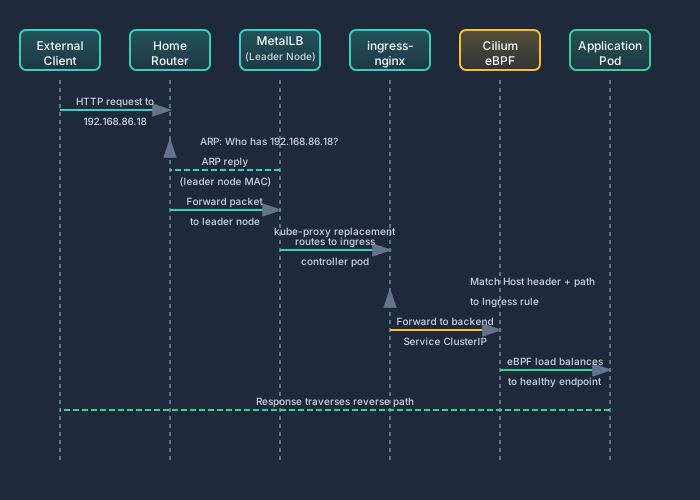
The key insight: MetalLB only handles the “get traffic to a node” problem. Once the packet is on a node, Cilium’s eBPF takes over for all subsequent routing — from the ingress controller to the backend service, and from the service to the actual pod.
ingress-nginx
Section titled “ingress-nginx”Helm Chart: 4.14.1 | Controller: 1.14.1
ingress-nginx is the cluster’s HTTP(S) ingress controller. It’s the single point of entry for all HTTP traffic from outside the cluster. Every web-facing service — Home Assistant’s dashboard, OpenClaw’s API, Hubble’s UI when port-forwarded — routes through it.
Service Topology
Section titled “Service Topology”| Service | Type | IP | Ports |
|---|---|---|---|
| ingress-nginx-controller | LoadBalancer | 192.168.86.18 | 80 (HTTP), 443 (HTTPS) |
| ingress-nginx-controller-admission | ClusterIP | — | 443 (webhook) |
| ingress-nginx-default-backend | ClusterIP | — | 80 |
| ingress-nginx-controller-metrics | ClusterIP | — | 10254 |
The controller service is the only LoadBalancer type — MetalLB assigns it 192.168.86.18. The admission webhook validates Ingress resources before they’re applied (catching syntax errors at apply-time rather than runtime). The default backend returns a 404 for any request that doesn’t match a configured Ingress rule. Metrics on port 10254 expose Prometheus-format data for monitoring.
TLS Termination
Section titled “TLS Termination”TLS is handled by cert-manager (v1.16, upgraded from v1.13.3 as K8s v1.29 prerequisite), which provisions and renews certificates automatically. The ingress controller terminates TLS at the edge — backend pods receive plain HTTP. This simplifies application configuration and centralizes certificate management.
For services accessed over Tailscale, TLS isn’t strictly necessary (the WireGuard tunnel is already encrypted), but I run it anyway. Defense in depth, and it means the same Ingress definitions work whether the request comes over Tailscale or the local network.
Why Not Traefik or Gateway API
Section titled “Why Not Traefik or Gateway API”ingress-nginx was chosen for two reasons: maturity and simplicity. It’s the most widely deployed ingress controller in the Kubernetes ecosystem, which means every problem I hit has been hit by someone else first. Traefik has a nicer dashboard and more features, but features mean complexity, and on a cluster where I’m also debugging Cilium policies, Longhorn storage, and ARM64 compatibility issues, I want the ingress layer to be boring.
I’m watching the Kubernetes Gateway API as the eventual replacement for Ingress resources. Cilium has its own Gateway API implementation, which would collapse the ingress controller and CNI into a single component. But as of now, the Gateway API ecosystem on ARM64 isn’t as battle-tested as ingress-nginx, so I’m staying with what works.
Network Architecture Summary
Section titled “Network Architecture Summary”| Component | Version | Purpose |
|---|---|---|
| Cilium | 1.17 | CNI, eBPF dataplane, kube-proxy replacement, network policy enforcement, FQDN egress filtering |
| Hubble | (bundled with Cilium) | Network observability — flows, DNS, HTTP, policy verdicts |
| MetalLB | v0.13.12 | Bare-metal LoadBalancer implementation, L2 mode |
| ingress-nginx | Controller 1.11.8 (upgraded from 1.14.1) | HTTP(S) ingress routing, TLS termination |
| cert-manager | v1.16 | Automated TLS certificate provisioning and renewal |
| Tailscale | (node-level) | Encrypted remote access via WireGuard mesh, no exposed ports |
| Route 53 DDNS | CronJob (every 5m, dry-run) | Keeps public A records aligned to the rotating residential WAN IP without changing ingress architecture |
| LiteLLM Gateway path | TCP/4000 internal service egress | In-cluster model routing from OpenClaw namespaces via explicit NetworkPolicy allowances |
| MCP web tools | Backend/tool-pod egress | Public web retrieval without broadening direct agent-pod internet access |
| Kernel | 6.1.115-vendor-rk35xx | Rockchip vendor kernel with eBPF support for Cilium |
Every layer in this stack was chosen to solve a specific bare-metal problem. MetalLB because cloud LoadBalancer doesn’t exist here. Cilium because iptables doesn’t scale well on 8-core SBCs. ingress-nginx because HTTP routing needs to happen somewhere. cert-manager because manual certificate management doesn’t survive 3 AM renewals. Tailscale because exposing ports to the public internet is not an option when Home Assistant controls your thermostat.
The architecture is intentionally layered so each component can be replaced independently. If Cilium’s Gateway API matures enough, ingress-nginx can be removed. If I move to a network with BGP support, MetalLB can switch from L2 to BGP without touching anything above it. If a better CNI emerges for ARM64, the ingress and LoadBalancer layers don’t care.
That modularity isn’t theoretical — it’s how the cluster has actually evolved. Components have been swapped, upgraded, and reconfigured without full-stack rebuilds. That’s the payoff for doing the hard work of understanding each layer independently.