Home Automation on Kubernetes
Home Automation on Kubernetes
Section titled “Home Automation on Kubernetes”Home automation gets treated as a hobby project. Flash an SD card, install Home Assistant OS, add devices, hope it doesn’t break. That’s fine until you’re relying on it — until your thermostat automation failing means a $400 energy bill, or your camera feed going dark means you don’t see someone at the door.
I already run a 4-node Kubernetes cluster on Orange Pi 5 SBCs. Rather than dedicate separate hardware to home automation, I run Home Assistant on the same cluster with the same operational discipline I’d apply to any production workload: PostgreSQL instead of SQLite, Longhorn-replicated storage, Cilium network policies for IoT segmentation, and Tailscale for authenticated remote access. No ports exposed to the internet. No single points of failure for storage.
Architecture
Section titled “Architecture”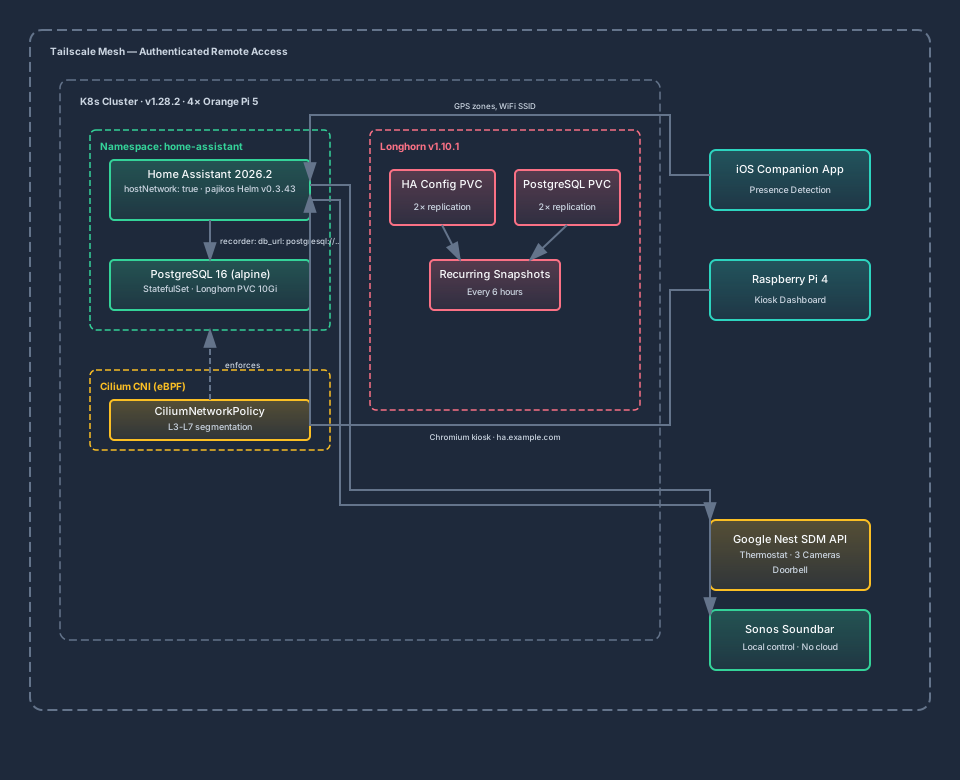
Why Kubernetes for Home Automation
Section titled “Why Kubernetes for Home Automation”The honest answer: I already had the cluster. But there are real advantages beyond convenience.
Storage resilience. Longhorn replicates every volume across two nodes. When I take a node offline for maintenance — kernel updates, thermal paste, whatever — Home Assistant’s config and database remain available. On a standalone Pi, pulling the power means pulling the only copy of your data.
Rolling updates. Updating Home Assistant from 2026.1 to 2026.2 is a Helm value change: update the image tag, helm upgrade, and the StatefulSet performs a rolling restart. If the new version breaks something, helm rollback takes me to the previous state in seconds. On HA OS, a bad update means restoring from backup.
Resource sharing. The Orange Pi 5’s RK3588S (8 cores, 16 GB RAM) is massively overpowered for Home Assistant alone. Running HA alongside my AI agent platform, graph databases, and tool servers means the hardware is actually utilized. The full HA stack — Core plus PostgreSQL — uses roughly 310m CPU and 1 GiB memory, taking total cluster utilization from 13% to 14.3% CPU.
Unified operations. One set of tools for monitoring, logging, and debugging. kubectl logs, kubectl describe, Longhorn dashboard ��� the same workflow I use for every other workload.
Key Design Decisions
Section titled “Key Design Decisions”PostgreSQL from Day One
Section titled “PostgreSQL from Day One”This was non-negotiable. Home Assistant defaults to SQLite for its recorder database, which stores all entity state history. SQLite on local storage is fine. SQLite on network-attached storage — which is what Longhorn provides via iSCSI — causes WAL (Write-Ahead Logging) locking issues under concurrent access. I’ve seen the “database is locked” errors in enough forum posts to know this isn’t theoretical.
PostgreSQL eliminates the problem entirely. It handles concurrent writes natively, performs better under load, and is a first-class citizen on Kubernetes with decades of operational knowledge behind it.
I chose a plain postgres:16-alpine StatefulSet over more complex options:
- Not Bitnami. Broadcom changed Bitnami’s licensing in August 2025 — free images are no longer available. I’m actively migrating off Bitnami dependencies elsewhere in the cluster (Redis → Valkey).
- Not CloudNativePG. It’s a solid operator, but running a Kubernetes operator for a single PostgreSQL instance is like hiring a building superintendent for a studio apartment. A StatefulSet with a Longhorn PVC and a CronJob for
pg_dumpcovers my needs.
The HA recorder config is straightforward:
recorder: db_url: postgresql://homeassistant:${PASSWORD}@postgresql.home-assistant.svc.cluster.local/homeassistant purge_keep_days: 30 commit_interval: 5 exclude: domains: - automation - script - sceneThirty days of history, 5-second commit interval, noisy domains excluded to keep the database manageable. The PostgreSQL PVC gets its own 10Gi Longhorn volume with 2× replication.
hostNetwork for mDNS Discovery
Section titled “hostNetwork for mDNS Discovery”Home Assistant discovers devices on the local network via mDNS/Bonjour and SSDP. Standard Kubernetes pod networking isolates pods from the LAN broadcast domain — which is exactly the wrong behavior for home automation.
The solution most K8s HA deployments use is hostNetwork: true, which puts the pod directly on the node’s network stack. Combined with dnsPolicy: ClusterFirstWithHostNet (so Kubernetes DNS still works), HA can see every device on the LAN while still resolving cluster-internal service names.
hostNetwork: truednsPolicy: ClusterFirstWithHostNetI evaluated Multus CNI (dual-homed pods with both overlay and LAN interfaces) and Avahi reflectors (mDNS bridging between pod and host networks). Both add complexity without proportional benefit for a homelab. The pragmatic choice is hostNetwork, with the security tradeoff explicitly acknowledged and mitigated through other layers.
The hostNetwork Security Tradeoff
Section titled “The hostNetwork Security Tradeoff”Here’s the tension: hostNetwork: true bypasses Cilium’s NetworkPolicy enforcement for the HA pod. The pod is on the host’s network stack, not the CNI overlay, so CiliumNetworkPolicy rules that reference pod selectors or namespace labels don’t apply.
This is an accepted tradeoff, not an ignored one. Mitigation:
- Tailscale is the only external access path. No ports are exposed to the public internet. HA is accessible only from devices on the tailnet, authenticated by Tailscale’s identity layer.
- HA’s own auth. Home Assistant has its own user authentication with MFA support.
- IoT segmentation happens at the network level. CiliumNetworkPolicy still governs all other pods in the
home-assistantnamespace (PostgreSQL, future MQTT broker, future Zigbee2MQTT). The HA pod itself communicates outbound to the Nest SDM API and the Sonos devices on the LAN — both of which require LAN access by nature. - Monitoring. The cybersecurity agent runs Trivy k8s config scans that flag
hostNetworkusage, keeping the tradeoff visible in security posture reports.
CiliumNetworkPolicy for IoT Segmentation
Section titled “CiliumNetworkPolicy for IoT Segmentation”Even with HA on hostNetwork, the rest of the home automation stack benefits from Cilium’s L3-L7 policy enforcement. As I add MQTT brokers, Zigbee gateways, and other IoT infrastructure in Phase 2, each component gets explicit ingress/egress rules:
apiVersion: cilium.io/v2kind: CiliumNetworkPolicymetadata: name: postgresql-policy namespace: home-assistantspec: endpointSelector: matchLabels: app: postgresql ingress: - fromEndpoints: - matchLabels: app: home-assistant toPorts: - ports: - port: "5432" protocol: TCP egress: - toEntities: - kube-apiserverPostgreSQL accepts connections only from the Home Assistant pod, on port 5432, TCP only. No other pod in the cluster can reach it. When Mosquitto and Zigbee2MQTT arrive, they’ll get similarly scoped policies — Mosquitto accepts MQTT traffic (port 1883) only from HA and Zigbee2MQTT, Zigbee2MQTT accepts management traffic only from HA.
L7 policies matter for IoT because smart devices are notoriously chatty and occasionally compromised. A device that should only speak MQTT shouldn’t be able to reach a PostgreSQL port. Cilium enforces this at the kernel level via eBPF, with minimal performance overhead on the resource-constrained nodes.
Tailscale for Remote Access
Section titled “Tailscale for Remote Access”No ingress controller, no TLS certificate management, no ports exposed to the public internet. Home Assistant is accessible at ha.example.com via Tailscale’s DNS, which resolves only within the tailnet. Authentication happens at the WireGuard tunnel level before HA’s web UI is ever reachable.
This is a deliberate security posture. Home automation systems are high-value targets — they control physical devices, have LAN access to IoT networks, and often run with elevated privileges. Exposing HA to the internet, even behind reverse proxy authentication, increases the attack surface for no benefit. Tailscale gives me access from my phone, laptop, or any device on the tailnet, from anywhere, with zero public exposure.
Floating Pod Placement
Section titled “Floating Pod Placement”Phase 1 has no USB device constraint — my current devices (Nest thermostat, Google cameras, doorbell, Sonos) are all WiFi/cloud or local network devices. No Zigbee stick means no node affinity requirement. The HA pod can schedule on any node, and Longhorn handles storage replication transparently.
When I add a Zigbee coordinator in Phase 2, I’ll use a network-based coordinator (SLZB-06, ~$35) that connects via Ethernet rather than USB. This eliminates the USB passthrough problem entirely — no privileged containers, no hostPath device mounts, no node pinning. Zigbee2MQTT connects to the coordinator via TCP (tcp://192.168.1.50:6638), making it fully portable across K8s nodes.
The DakBoard Replacement
Section titled “The DakBoard Replacement”We had a Raspberry Pi 4 in the living room running DakBoard — a cloud-hosted dashboard service showing weather, calendar, and our daughter’s daily chore checklists. $5/month, $60/year. It worked, but it was limited: no device control, no camera feeds, no real-time sensor data, and we were paying a subscription for what’s essentially a web page on a screen we already own.
Replacing it with a Home Assistant Lovelace dashboard was one of the most satisfying parts of this project. The Pi 4 now runs Chromium in kiosk mode pointed at a dedicated HA dashboard view:
@xset s off@xset -dpms@xset s noblank@chromium-browser --noerrdialogs --disable-infobars --kiosk https://ha.example.com/lovelace/livingroomWhat the Dashboard Shows
Section titled “What the Dashboard Shows”The layout mirrors what DakBoard provided, but adds capabilities DakBoard never could:
| Element | Implementation | DakBoard Could Do This? |
|---|---|---|
| Clock + weather forecast | clock-weather-card (HACS) | ✅ Yes |
| Week calendar (horizontal scroll) | atomic-calendar-revive (HACS) + Google Calendar integration | ✅ Yes |
| Our daughter’s chore checklists | HA To-Do Lists + Mushroom cards — Wakeup (7 items) + Bedtime (6 items) | ✅ Yes |
| Daily dad joke | REST sensor hitting icanhazdadjoke.com + Markdown card | ✅ Yes |
| School traffic / commute time | google_travel_time integration | ✅ Yes |
| Thermostat control | Nest climate card — tap to adjust | ❌ No |
| Camera feeds | Nest SDM live streams — porch, backyard, doorbell | ❌ No |
| Sonos controls | Media player card — play/pause/volume | ❌ No |
| Presence indicators | Person cards — who’s home, who’s away | ❌ No |
Our daughter’s chore lists are worth calling out. The DakBoard version was static — just a list of items we had to update via a cloud portal. The HA version uses native To-Do lists that she can check off by tapping the screen, and they auto-reset on schedule. Her wakeup routine (eat breakfast, bathroom routine, get dressed, brush hair, make bed, hug mom/dad) and bedtime routine (allergy meds, pajamas, brush hair, hug mom/dad) are interactive instead of decorative.
The lovelace-wallpanel HACS integration rotates scenic background images, matching the DakBoard aesthetic. Dark theme, auto-dimming based on time of day. It looks better than what we were paying for.
Savings: $60/year, immediately. The Pi 4 was already owned hardware.
Presence Detection and Agent Integration
Section titled “Presence Detection and Agent Integration”The HA Companion App on my phone reports GPS location, WiFi SSID, and activity type to Home Assistant. HA maps these to zones — home, work, school, grocery stores — and exposes them as person.father and person.mother entities.
This is where home automation intersects with my AI agent platform. Presence data flows from HA to my agent via webhooks:
automation: - alias: "Presence update to agent" trigger: - platform: state entity_id: person.father action: - service: rest_command.agent_presence data: person: "spencer" zone: "{{ states('person.father') }}"The agent uses presence context to adjust its behavior: suppress non-urgent alerts when I’m driving, surface the grocery list when I’m at the store, adjust communication style based on whether I’m at work or home. Location data stays entirely local — HA runs on my cluster, not in the cloud, and the agent gets zone names (“home,” “work”), not raw GPS coordinates.
MCP Gateway Integration
Section titled “MCP Gateway Integration”Beyond presence webhooks, the agent platform accesses Home Assistant through two paths:
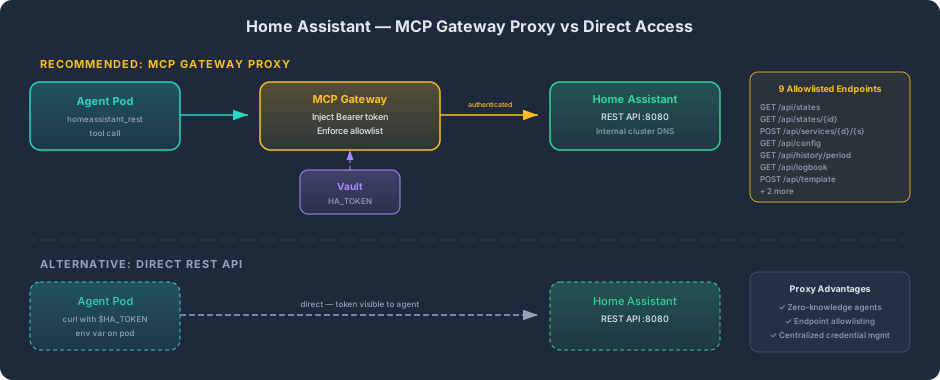
REST API (Direct). HA exposes a full REST API at /api/ — entity states, service calls, history, logbook, templates. The agent’s pod reaches HA via the internal cluster DNS (home-assistant.home-assistant.svc.cluster.local:8080), authenticated with a long-lived access token managed through Vault and injected via External Secrets Operator.
MCP Gateway Proxy. For agent tool calls, the MCP Gateway provides an authenticated proxy with 9 allowlisted endpoints — states, services, config, history, logbook, and template rendering. The gateway injects the HA bearer token from Vault so that agent pods never handle the raw credential. Agents call homeassistant_rest through the gateway’s unified tool interface:
{ "server": "gateway", "tool": "homeassistant_rest", "arguments": { "method": "GET", "path": "/api/states/climate.nest_thermostat" }}This gives agents read access to thermostat state, presence data, camera status, and any HA entity — plus write access to call services (adjust temperature, trigger automations, control media). The allowlist prevents accidental access to HA’s admin endpoints (user management, add-on control, system restart).
Nest Camera Integration
Section titled “Nest Camera Integration”WebRTC Reliability (FAD-352, FAD-470)
Section titled “WebRTC Reliability (FAD-352, FAD-470)”The Nest camera integration — connecting Google Nest cameras to Home Assistant via the Nest SDM (Smart Device Management) API and WebRTC — went through multiple reliability iterations. The initial implementation had three failure modes that each caused the feed to freeze or disconnect:
Track listener race condition. WebRTC connections fire ontrack events when media streams arrive. The dashboard code attached the stream to a video element in the handler, but occasionally the track arrived before React mounted the DOM element. Fix: buffer incoming tracks and attach once the ref is set.
WebSocket lifecycle disconnect. The HA WebSocket session that negotiates WebRTC has its own lifecycle — it disconnects during HA restarts, network blips, or session timeouts. The original code didn’t handle reconnection, so a single HA restart killed all camera feeds until the page was manually refreshed. Fix: WebSocket reconnection with exponential backoff, plus WebRTC session re-negotiation after reconnect.
Retry storm. When the camera was offline (firmware update, network issue), the reconnection logic retried aggressively — hundreds of attempts per minute, which triggered Nest’s rate limits and made recovery take even longer. Fix: capped exponential backoff with jitter, plus a frame watchdog that detects frozen feeds without hammering the connection.
API Quota Management (FAD-439)
Section titled “API Quota Management (FAD-439)”Google’s Nest SDM API imposes a daily quota on ExecuteDeviceCommand calls. Every WebRTC session negotiation consumes a command call. The retry storm bug burned through the daily quota by mid-morning before the backoff fix was applied.
The operational lesson: any integration with a rate-limited external API needs to be aware of its quota budget. Reconnection strategies that work fine against your own infrastructure (retry aggressively, fail fast) can be catastrophic against quota-limited cloud APIs. The camera widget now tracks its reconnection rate and backs off exponentially, preserving quota for legitimate session renewals throughout the day.
Family Dashboard Scaffold
Section titled “Family Dashboard Scaffold”The DakBoard replacement described above runs as a Home Assistant Lovelace dashboard on a Pi 4 kiosk. A separate family dashboard application — a Next.js 14 + React web app — is scaffolded and ready for cluster deployment. This standalone dashboard is designed for richer interactivity than Lovelace supports: custom task workflows for our daughter, data visualizations pulling from the household financial system, and a layout optimized for the living room display.
The scaffold includes a Dockerfile (ARM64-native multi-stage build), devspace.yaml for development iteration, and TypeScript configuration. Deployment to the cluster is the next step — connecting it to Home Assistant and the Foundry financial data via their respective APIs.
Deployment Details
Section titled “Deployment Details”| Component | Image / Chart | Storage | Resources |
|---|---|---|---|
| Home Assistant | pajikos Helm v0.3.43, HA 2026.2.1 | 10Gi Longhorn PVC (2× repl) | 250m/512Mi req, 2000m/2Gi limit |
| PostgreSQL | postgres:16-alpine StatefulSet | 10Gi Longhorn PVC (2× repl) | 100m/256Mi req |
| Longhorn snapshots | Recurring Job | — | Every 6 hours, retain 10 |
| Longhorn backups | Recurring Job | S3-compatible target | Daily, retain 30 |
Namespace: home-assistant
Helm chart: pajikos/home-assistant — auto-updated with new HA releases, low issue count (2 open as of Feb 2026), supports StatefulSet by default with configurable persistence, init containers (for HACS installation), and templated configuration.yaml.
Phase 2 Roadmap
Section titled “Phase 2 Roadmap”Phase 1 is intentionally minimal: prove the platform with WiFi/cloud devices (Nest, Sonos), then expand.
| Addition | What It Enables | Key Decision |
|---|---|---|
| Zigbee2MQTT + Mosquitto | Zigbee device support (sensors, switches, lights) | Network coordinator (SLZB-06) over USB — eliminates node pinning |
| Matter Server | Matter/Thread device support | hostNetwork: true for IPv6 multicast |
| ESPHome | Custom ESP32/ESP8266 sensors | hostNetwork: true for mDNS OTA |
| Frigate | Local camera AI (person/vehicle detection) | Orange Pi 5’s RK3588 has 6 TOPS NPU — explore for inference |
Each addition is a separate Kubernetes Deployment with its own PVC, resource limits, and CiliumNetworkPolicy. The HA “Apps” store doesn’t exist in Container mode — every add-on runs as a standalone pod. For someone already running Kubernetes, this is arguably a feature: each component has its own lifecycle, resource bounds, and security policy.
What This Demonstrates
Section titled “What This Demonstrates”Production operations on constrained hardware. Not “it works on my Pi” — PostgreSQL with proper replication, automated snapshots, network policies, and rolling updates. The kind of operational discipline that transfers directly to cloud or enterprise Kubernetes.
Security-first IoT design. IoT devices are high-risk by nature. Running them behind Tailscale (no public internet exposure), with CiliumNetworkPolicy segmentation (each component scoped to minimum required connectivity), and on a cluster with automated security scanning is a fundamentally different posture than plugging a smart hub into your router and hoping for the best.
Practical tradeoff documentation. Every design decision has an explicit tradeoff. hostNetwork for mDNS breaks NetworkPolicy enforcement — acknowledged, mitigated, monitored. SQLite on Longhorn causes locking — replaced with PostgreSQL from day one. Container mode lacks the Apps store — treated as a feature for K8s-native deployment. The value isn’t in making perfect decisions; it’s in making informed ones and documenting why.