Hand-Crafted SVGs vs Mermaid: Why I Ditched Diagrams-as-Code
Diagrams-as-code is one of those ideas that sounds obviously correct. Write your architecture diagram in a text DSL, version control it alongside your code, render it automatically. No more stale Visio files. No more “who has the editable version?” No more designers in the loop for a box-and-arrow diagram.
Mermaid.js is the most popular implementation: markdown-like syntax, renders in GitHub, integrates with most documentation platforms. I used it for every diagram on this site — 15 architecture diagrams across 9 pages. Flowcharts, sequence diagrams, layer stacks, pipeline flows.
Then I replaced every single one with hand-crafted SVGs. Here’s why.
The Problem Isn’t Mermaid. It’s What You’re Optimizing For.
Section titled “The Problem Isn’t Mermaid. It’s What You’re Optimizing For.”Mermaid optimizes for authoring convenience. Write some text, get a diagram. That’s genuinely useful when the diagram is secondary — a quick illustration in a README, a sequence diagram in a PR description, a dependency graph that nobody will study closely.
But architecture diagrams on a portfolio site aren’t secondary. They’re often the first thing a reviewer looks at. They communicate system design at a glance. They need to be readable, clear, and visually intentional. And that’s where diagrams-as-code falls apart — because the code is optimizing for the author, not the reader.
Here’s what I mean concretely.
Fixed Width in a Responsive World
Section titled “Fixed Width in a Responsive World”Mermaid’s SVG output uses hardcoded viewBox dimensions calculated from node count and layout algorithm internals. On a site with a wide content column (mine is 75rem with the right sidebar hidden), diagrams rendered at roughly 40-50% of available width. Too small to read without squinting.
I tried the obvious CSS fixes: max-width: 100%, container scaling, font-size overrides. Mermaid sets its internal SVG dimensions before CSS applies. Scaling a 400px-wide SVG to fill an 800px container doesn’t make it readable — it makes it blurry. The text was rendered at a size that assumed 400px of space, and stretching it doesn’t change the font metrics.
An SVG with a proper viewBox and width="100%" just… fills the space. On a wide monitor it stretches. On mobile it scales down proportionally. The text is defined in the SVG coordinate system and renders crisply at any physical size. This is how SVG is supposed to work. Mermaid uses SVG as an output format while fighting against SVG’s actual strengths.
The Layout Algorithm Knows Better Than You (It Doesn’t)
Section titled “The Layout Algorithm Knows Better Than You (It Doesn’t)”Mermaid uses Dagre or ELK layout engines to decide where nodes go. These algorithms minimize edge crossings and optimize for compactness. That’s mathematically sound and practically useless for architecture diagrams.
In an architecture diagram, spatial position carries meaning. Infrastructure goes at the bottom. Applications sit in the middle. User-facing services are at the top. Security boundaries wrap specific groups. This isn’t decoration — it’s how engineers read these diagrams. We scan top-to-bottom, layer by layer.
Mermaid doesn’t care about your intended reading order. It rearranges nodes to minimize edge crossings, which sometimes means your database ends up above your API gateway and your message broker is floating in no-man’s-land. You can fight it with invisible edges and subgraph hacks, but at that point you’re writing more hack code than you’d spend just placing the boxes yourself.
See It in Action
Section titled “See It in Action”Here’s a simple 6-node service architecture in Mermaid. The intent is three clear layers — user-facing at the top, application logic in the middle, data stores at the bottom:
%%{init: {'theme': 'dark'}}%%
graph TD
    CLIENT[Client Browser] --> GW[API Gateway]
    GW --> AUTH[Auth Service]
    GW --> APP[App Service]
    AUTH --> DB[(PostgreSQL)]
    APP --> DB
    APP --> CACHE[(Redis Cache)]
Notice what happened: Mermaid decided where every node goes. Auth Service and App Service are side-by-side (reasonable), but there’s no visual separation between layers. The “user-facing” tier, “application” tier, and “data” tier all blend into one undifferentiated column. PostgreSQL gets pulled toward the center because two edges point at it. On a 6-node graph this is tolerable. Add a message broker with a feedback loop and the layout starts actively fighting your intent.
The hand-crafted SVG version of this exact architecture is in the next section — same six nodes, same connections, radically different visual clarity.
Dark Theme: Close Enough Isn’t Close Enough
Section titled “Dark Theme: Close Enough Isn’t Close Enough”My site uses a custom dark theme — Starlight’s slate palette with specific color tokens for different component types (teal for agents, amber for tools, emerald for infrastructure, rose for security). Mermaid has a dark theme preset and themeVariables for customization.
The result always looked like a different application embedded in the page. Even with careful variable overrides, Mermaid’s internal color logic (gradient fills, border calculations, text contrast) does its own thing. The diagrams were dark, but they weren’t my dark. On a portfolio site where visual consistency matters, “close enough” isn’t.
Hand-crafted SVGs use the exact same hex values as the site’s CSS. They look like part of the page because they are part of the page.
Same Architecture, Your Palette
Section titled “Same Architecture, Your Palette”Here’s that same 6-node service architecture as a hand-crafted SVG — same nodes, same connections, but every pixel is intentional:
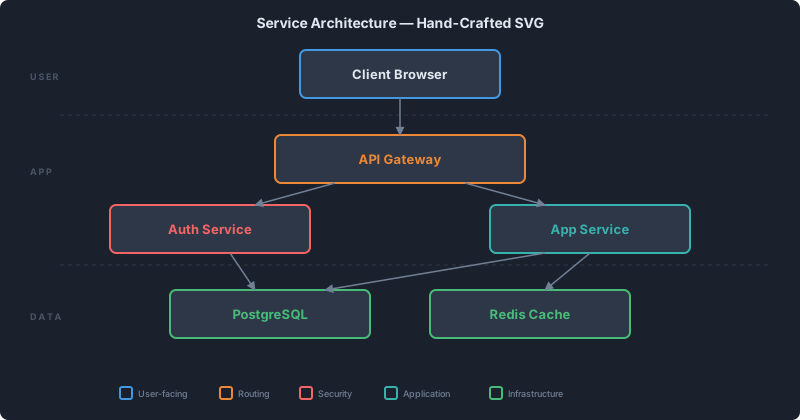
Three layers are visually separated with dashed dividers and labeled on the left margin. Each component type has a distinct color from the site’s own palette — blue for user-facing, amber for routing, rose for security, teal for application logic, emerald for infrastructure. The background is the same #1a202c slate as this page. Scroll back up to the Mermaid version: same architecture, but Mermaid’s generic dark theme and algorithmic layout communicate none of that intent.
Click to Zoom Changes Everything
Section titled “Click to Zoom Changes Everything”For a 15-node architecture diagram with service names, protocol labels, and data flow annotations, inline rendering isn’t enough. Readers need to zoom into subsections. Mermaid renders inline with no interaction — it’s a static SVG dumped into the page.
With hand-crafted SVGs, I added a click-to-maximize lightbox: pure CSS overlay with position: fixed, triggered by a click handler, dismissed by clicking the backdrop or pressing Escape. Zero dependencies. Takes a dense architecture diagram from “I can sort of see the boxes” to “I can read every label and trace every connection.”
This was maybe 30 lines of CSS and 10 lines of inline JavaScript. Not because Mermaid can’t have a lightbox — you could wrap Mermaid output the same way — but because once you’re solving the other problems, adding interaction to your own SVGs is trivial.
”But Hand-Crafted SVGs Don’t Scale”
Section titled “”But Hand-Crafted SVGs Don’t Scale””This is the argument I hear most: hand-crafted diagrams are expensive to create and maintain. You can’t git diff a visual change. You can’t regenerate from code when the architecture changes. Every update requires someone who understands SVG coordinate systems.
Two responses.
First, AI changed the effort equation. I created 15 architecture diagrams — complex ones, with gradients, arrows, multiple layers, consistent color coding — in a single session. The workflow: describe the layout in natural language, get an SVG, iterate on specifics (“move the message broker to the right, make the security boundary dashed”), commit. It’s faster than fighting Mermaid’s layout algorithm to produce a specific arrangement, because you’re describing what you want instead of trying to trick an algorithm into producing it.
Second, Mermaid’s “scalability” is overstated for this use case. These are architecture diagrams on a portfolio site. They change when the architecture changes, which is… rarely. Maybe a few times a year. The maintenance burden of editing an SVG file once a quarter, with AI assistance, is negligible. If I were generating 50 diagrams a day from live infrastructure data, yes, Mermaid (or D3, or Graphviz) would be the right call. For 15 mostly-static diagrams? The “scalability” argument is solving a problem I don’t have.
What I’d Still Use Mermaid For
Section titled “What I’d Still Use Mermaid For”I’m not anti-Mermaid. I’d use it for:
- Quick throwaway diagrams in PR descriptions or Slack messages
- Sequence diagrams in API docs where the content is simple and the layout algorithm works fine
- Auto-generated diagrams from live data (dependency graphs, CI pipelines)
- Collaborative editing where non-technical contributors need to modify diagrams
The common thread: situations where authoring speed matters more than visual quality, or where the diagram changes frequently enough that hand-crafting is genuinely expensive.
For anything that will be studied — architecture overviews, system design presentations, portfolio case studies — I’d reach for hand-crafted SVGs every time. The reader’s experience matters more than the author’s convenience.
The Numbers
Section titled “The Numbers”For the curious:
- 15 diagrams replaced across 9 pages
- Average file size: 4-8KB per SVG (~90KB total)
- Lightbox implementation: ~30 lines CSS + ~10 lines inline JS, zero npm dependencies
- Creation time: One evening session, AI-assisted
- Visual consistency: Same color tokens as site CSS (verified by hex value)
- Responsiveness: All diagrams scale from mobile to ultrawide without degradation
The full decision rationale is in ADR-007, if you want the formal version with alternatives-considered table.
The Meta-Lesson
Section titled “The Meta-Lesson”Every “X-as-code” tool makes the same implicit tradeoff: convenience of the authoring workflow in exchange for control over the output. That’s often a good trade. Infrastructure-as-code is worth it because the output (cloud resources) is too complex to manage manually. Tests-as-code is worth it because the output (test execution) needs to be deterministic.
Diagrams-as-code is worth it when diagrams are artifacts of a process — generated, updated, disposable. It’s not worth it when diagrams are artifacts of communication — crafted, intentional, meant to be studied. Knowing which situation you’re in is the whole game.